Weather & Clock Widget Plus
Interactive Saudi ArabiaWeather
4.12.64K Reviews
- Version
- 4.5.5.2
- Installs
- 100.00K
- Age Rating
- Everyone
Screenshots
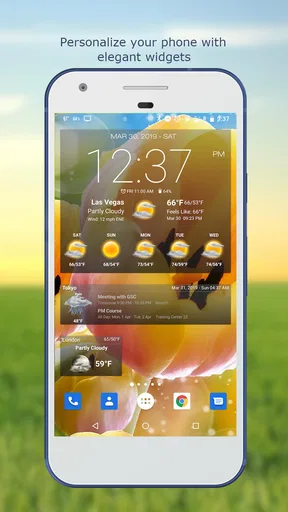
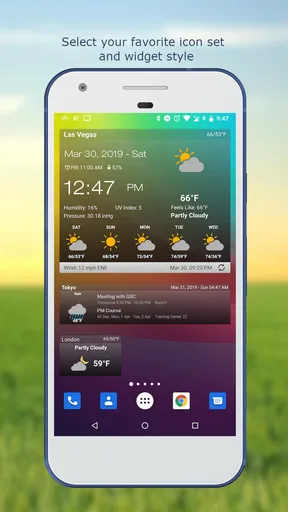
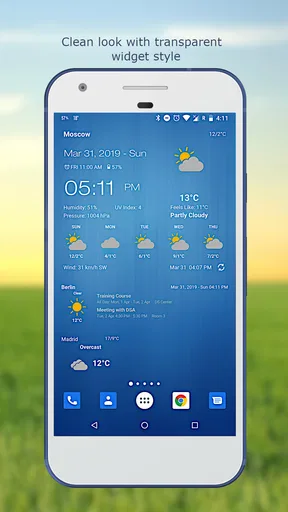
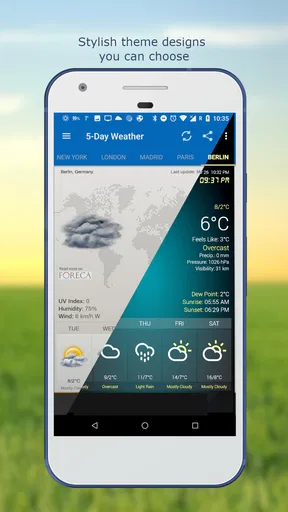
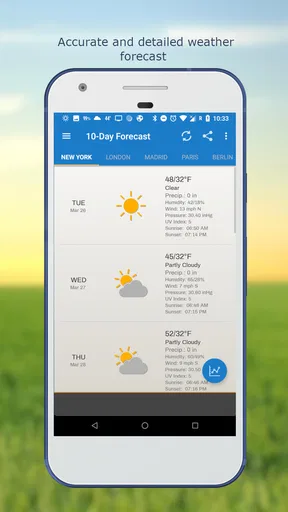
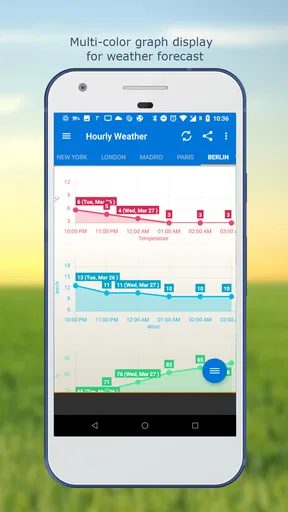
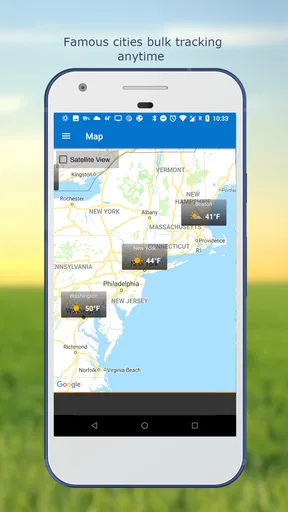
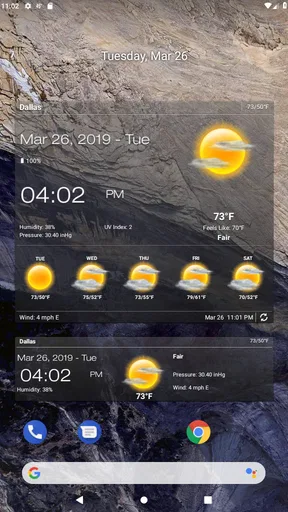
Our Review of Weather & Clock Widget Plus
 Analysis by Appyee
I tend to judge a weather app by what happens when several people in a home rely on it, not just by how attractive the forecast looks in a screenshot. Weather & Clock Widget Plus is interesting in that situation because it combines current conditions, future forecasts, and clock widgets in one Android app. I used it as the sort of quick household reference you check before school, work, errands, or a weekend trip, and I found that its strongest quality is convenience: the information can sit where you already look instead of requiring a separate search every time.
This is a paid weather app from Interactive Saudi Arabia, listed at $7.99, with an Everyone age rating. It has been available since March 7, 2014, and the current version is 4.5.5.2. Those details matter for expectations: this is an established utility rather than a brand-new experiment, but it also belongs to a category where phones already include capable free weather tools. The question is therefore not whether it can show weather at all, but whether its combination of widgets, clock information, and forecast access earns a place on a shared device.
How it works in a shared household
My favorite use for it is a household tablet or a phone that stays in a common area. A glance at the widget can answer the first practical questions of the day: Is a jacket sensible? Should outdoor plans move indoors? Does someone need to leave earlier because rain may affect the journey? A widget is especially useful here because nobody has to remember which weather app to open or whose account is currently active.
That shared-screen advantage is easy to underestimate. A conventional weather app often works best for one person who opens it, searches for a location, and reads a detailed forecast. A widget changes the behavior. It turns weather into passive information that is available to anyone holding the device. I would place it on a home screen that is visible to the people who actually coordinate the day, rather than hiding it on a secondary page with unrelated apps.
The clock element also makes sense on a communal device. It gives the screen a purpose even when nobody is checking the forecast. In a kitchen, hallway, or office, a weather-and-clock layout can replace the need to open two separate tools. That is a small benefit, but it is the kind of small benefit that becomes useful through repetition.
There is a trade-off, though. A common device usually serves different preferences. One person may care about rain before a walk, another about temperature before commuting, and another about the time in a different location. A single widget cannot perfectly represent everyone’s priorities. I would treat it as a shared glanceable display, not as a personal weather dashboard for every member of the household.
Setting it up without confusing personal and shared information
The most important setup decision is deciding what the app is supposed to represent. On my personal phone, I would configure it around my usual location and the forecast details I check most. On a household device, I would choose the home location and avoid treating the screen as somebody’s private travel planner. That boundary keeps the widget useful when different people pick up the device during the day.
This distinction also helps when a family member travels. If the shared tablet suddenly shows a temporary destination, everyone else may assume the home forecast has changed. I would make location changes deliberately and restore the household location afterward. The app can be useful for checking another place, but a shared screen needs a stable reference point or it stops being a reliable coordination tool.
I would also spend time choosing the widget size and placement rather than accepting the first arrangement. A compact widget may preserve more space for other household shortcuts, while a larger one can be easier to read from across a room. The right choice depends on the device and the people using it. Someone with weaker eyesight may benefit from a larger display, while a crowded phone home screen may need a smaller footprint.
Another practical boundary is notification and attention management. Weather information is valuable when it helps a decision, not when it becomes visual clutter. I prefer to keep the shared screen focused on the forecast and clock instead of filling it with unrelated information. Since this is a utility that people may consult repeatedly, a calm layout is more useful than a busy one.
There is no reason to assume that installing the app creates a family account or a shared profile. I would not use it as a place to divide household permissions or store private schedules. Its role is narrower and clearer: present weather and time information where the household can see it. That limitation is not a flaw by itself, but it should shape how you deploy it.
Using the forecast to coordinate ordinary plans
A realistic example is a weekday morning. One person checks the widget while preparing breakfast, sees that the day may change later, and mentions it before everyone leaves. Someone taking public transport can decide whether to carry rain protection; someone planning outdoor work can look beyond the current condition and consider the future forecast. The app does not coordinate the household automatically, but it can reduce the number of separate weather checks needed.
I find that the future forecast is more valuable than the current temperature in these situations. Current conditions tell you what is happening at the moment you look. Planning depends on what may happen after lunch, during the school run, or near the end of a work shift. The app’s real-time view is convenient, but its usefulness grows when I use it to compare now with later rather than treating one reading as the whole story.
For shared use, I would establish a simple habit: check the widget before leaving, then open the full forecast only when the plan is sensitive to timing. That avoids overreacting to a single glance while still keeping the process quick. It is a better workflow than repeatedly refreshing the weather without a decision in mind.
Another non-obvious use is coordinating chores. If laundry, gardening, a walk with a pet, or outdoor maintenance depends on dry conditions, the forecast can help the household choose a window instead of relying on whoever happens to check first. The app does not replace judgment, especially when conditions are changeable, but placing it on a shared screen makes the information easier to discuss.
I would still compare the forecast with local knowledge during unusual weather. A general weather app is useful for planning, but it should not become the only source for serious conditions or safety decisions. For routine household choices, it is convenient. For urgent warnings, I would use the most authoritative local alert source available as well.
What the age rating means in practice
The Everyone rating makes sense for the basic purpose of the app. Weather and clock information are naturally suitable for a broad audience, and a child can understand a simple temperature or forecast display. That makes the app comfortable on a family device from an age perspective.
Age suitability should not be confused with account or privacy suitability. A child using the same phone may see the location configured for the household, while an adult may use a personal phone with a different place selected. I would keep those contexts separate rather than assuming that a general age rating provides family-management features. The rating describes the content audience; it does not turn the weather app into a household administration tool.
Trust is also about how much weight people give the forecast. Younger users may interpret a weather icon as a promise rather than an estimate. I would explain that forecasts can change and that a sunny symbol does not guarantee perfect conditions all day. That is a useful lesson for anyone, but especially for children deciding what to wear or whether an outdoor plan is sensible.
For older relatives, readability may matter more than the number of available details. A widget that is technically informative can still be inconvenient if the text is too small or the layout feels crowded. I would test it on the actual shared device from the distance where people normally view it. If someone has to pick up the device every time just to read the display, the widget is not fulfilling its main household purpose.
Where it differs from the usual weather choices
The built-in weather app on a phone is often the easiest alternative because it is already installed and usually costs nothing extra. That option may be better for someone who only wants a basic forecast and does not care about customizing a combined clock-and-weather display. Paying for this app makes more sense when the widget experience is central to your routine.
Dedicated forecast services can also be preferable for users who want extensive radar views, severe-weather detail, or highly specialized information. I would not choose Weather & Clock Widget Plus solely because I need the deepest possible meteorological analysis. Its appeal is the everyday presentation: current weather, future planning, and a clock in a format that can stay visible.
Compared with a simple clock widget, it offers more context for deciding how to start the day. Compared with a full weather dashboard, it can feel less demanding because the essential information is available at a glance. That middle position is its clearest identity. It is neither just a time display nor a tool I would automatically recommend to weather enthusiasts who want every possible layer of detail.
The paid price is the biggest decision point. A $7.99 purchase is easier to justify for someone who will use a widget every day, especially on a shared tablet or a device mounted in a common space. It is harder to justify if you already like the free weather app on your phone and only open it occasionally. Before paying, I would ask whether the widget will change your routine or merely duplicate something you already have.
Everyday strengths and the friction I noticed
The app’s strongest practical feature is not a single forecast number; it is the reduced effort between wondering about the weather and seeing an answer. The widget can make weather part of the home screen rather than a separate task. That is particularly helpful for people who forget to check conditions until they are already walking out the door.
The combination with a clock is another thoughtful touch. A shared device can remain useful throughout the day instead of becoming relevant only during weather checks. For a household that wants one calm information screen, that combination is more coherent than placing separate widgets side by side.
The friction comes from the fact that a widget is only useful when it remains accurate for the intended location and readable on the chosen screen. Shared devices are prone to being rearranged, and a person may change the location without telling anyone else. I would label the device mentally as the household display and avoid casual configuration changes. That simple rule prevents many misunderstandings.
I would also avoid treating the app as a replacement for conversation. It can show the same forecast to everyone, but it cannot know whether one person needs to arrive early, whether outdoor equipment can stay outside, or whether a plan has flexibility. The best result comes when the widget supplies a common starting point and the household makes the decision together.
Its long availability is reassuring for a utility I might want to keep around, and the current release is version 4.5.5.2. The minimum operating-system requirement is Android 7.0, so compatibility should be checked against the specific device before purchase, particularly if the shared tablet is older. That requirement is reasonable for many devices, but it can exclude aging hardware that a family keeps for communal use.
Who should install it, and who should skip it
I would recommend it to someone who genuinely likes widgets, wants weather and time together, and will check the display often. It is also a good fit for a household that uses one phone or tablet as a common reference point and wants everyone to see the same home location without passing the device around.
It may suit a commuter who makes quick clothing or travel decisions, a parent organizing outdoor plans, or anyone who prefers information to be visible before opening an app. The value is strongest when the forecast is part of repeated routines rather than an occasional curiosity.
I would skip it if you only need a quick temperature reading once in a while, if you already have a free widget that does everything you want, or if your main interest is advanced weather analysis. I would also hesitate on a very old shared device until checking that Android 7.0 support is available. Paying for a duplicate experience is not good value, even if the app itself is competently designed.
The audience size suggests that it has found a meaningful group of users: the app has more than 100 thousand installs, an average rating of 4.1 from around 32 thousand ratings, and roughly 2.6 thousand written reviews. Those figures show established interest, but they should not replace your own judgment about the widget style and household workflow. A popular weather tool can still be the wrong fit for a person who rarely uses home-screen widgets.
My household verdict
After using Weather & Clock Widget Plus as a shared weather reference, I see it as a focused convenience purchase rather than an essential replacement for every weather service. Its best idea is simple: put the information people repeatedly ask about—weather and time—where it can be seen without a separate search. That works especially well on a common device, provided the location and layout are kept stable.
The key trade-off is clear: you pay for a more visible, widget-centered routine, not merely for the existence of a forecast. If that routine fits your home, the app can make morning planning and small daily decisions smoother. If each person needs a private location, specialized forecasts, or extensive alert tools, separate personal apps will probably be more suitable.
I would install it for a household tablet in the kitchen, configure the home location, choose a readable widget, and treat the display as a shared reference rather than a private account space. On my personal phone, I would choose it only if I preferred its clock-and-weather presentation over the built-in alternative. In that specific role, it is a practical and approachable weather app from Interactive Saudi Arabia, with enough flexibility for daily use but clear limits that are worth understanding before spending the asking price.
My final recommendation is therefore positive but selective. Weather & Clock Widget Plus is most convincing when weather needs to be visible, shared, and checked repeatedly. It is less compelling when a free default app already covers your needs. For the right household setup, its quiet presence on the home screen is the feature that matters most.
Verdict
Strengths of Weather & Clock Widget Plus
- Accurate forecasts with clear hourly and daily views
- Multiple widget sizes fit different home-screen layouts
- Customizable themes, colors, and clock display styles
- Quick access to weather details without opening the app
- Useful alerts for rain, storms, and temperature changes
Limitations of Weather & Clock Widget Plus
- Some advanced widgets or themes may require a paid upgrade
- Frequent location updates can increase battery consumption
- Weather accuracy depends on available local data sources
- Many customization options may feel overwhelming at first
- Widgets may need manual refreshing after system updates
Similar Picks in This Category
View All
Weather - By Xiaomi
Xiaomi Inc.4.1

Weather & Radar Forecast
WetterOnline4.8

Weather
OneLouder Apps4.6

AccuWeather: Weather Radar
AccuWeather3.6

The Weather Channel - Radar
The Weather Channel4.6

1Weather Forecasts & Radar
OneLouder Apps4.3
Frequently Asked Questions
What is Weather & Clock Widget Plus?
Weather & Clock Widget Plus is a customizable Android widget designed to place weather information, forecasts, time, date, and related details directly on your home screen. After adding it, you can usually check current conditions without opening a separate weather app. Available layouts, forecast details, and appearance options may vary depending on the version installed and the weather data provider used by the app.
What information does Weather & Clock Widget Plus display?
The widget can provide commonly requested details such as the current temperature, weather condition, location, time, date, and upcoming forecast information. Some configurations may also show humidity, wind, precipitation chances, sunrise and sunset times, or additional weather statistics. The exact information depends on the selected widget style, your location settings, and the data available from the service supporting the app.
How do I add and customize the widget?
After installing Weather & Clock Widget Plus, add it from your device’s home-screen widget menu, then choose the size and design that best fits your layout. Depending on the available settings, you may be able to change colors, transparency, fonts, clock formats, weather units, update intervals, and displayed forecast elements. Android launchers differ, so the steps may not look identical on every phone.
Does Weather & Clock Widget Plus require location access or an internet connection?
The app generally needs an internet connection to retrieve updated weather information. Location permission may be requested so the widget can automatically identify your current area, although you may be able to enter a city manually instead. If location access is disabled, the widget can still work with a selected location in supported versions, but automatic updates while traveling may be limited.
Why might the weather or widget updates be delayed?
Weather widgets can update less frequently because of Android battery-saving rules, restricted background activity, disabled notifications, weak connectivity, or limits imposed by the weather data service. If information appears outdated, check that the app can run in the background, remove it from battery optimization, confirm internet access, and refresh the widget manually when possible. Forecast accuracy also depends on the provider and the selected location.
